Is Your Bass Getting Lost in the Mix? Here's How to Make It Cut Through on Any Device (Without Muddying Everything)


You sit there, with the bass solo. It sounds round, deep, and incredibly powerful. Then you take the solo off, the guitars come in, the kick drum comes in, and... poof.
The bass disappears or, worse, turns everything into a quagmire.

If you raise the fader, the low-end energy crashes into the kick drum, and the two instruments start to war. If you lower it to make room for the kick drum, the song loses its backbone, and you can no longer distinguish the melody the bassist is playing.
You've tried EQing, you've slammed the compressor, but the bass still isn't focused. Why? Because you're trying to fix a harmonic problem using the wrong tools.
The Limit of EQ and Compression
When a bass note plays, the vast majority of the physical energy resides in the low frequencies. That's the weight, the "thump."
But do you know what allows your ear to identify the melody and perceive the bass even on a phone or laptop? The harmonic content above, in the midrange. If your starting signal is too clean and lacks harmonics, an equalizer won't save you.
EQ can only enhance what's already there . Compression and equalization manage dynamics and balance, but they don't add anything new.

The real solution: Parallel Saturation
To make the bass cut through without having to destructively raise the low frequencies, you need to generate new harmonics in the mid-range through saturation (or distortion).
But be careful: if you put the saturator directly on the entire track, you will end up saturating the subs and lows too obviously, making your low-end unnatural and completely lacking in impact.
The pro method is parallel saturation :
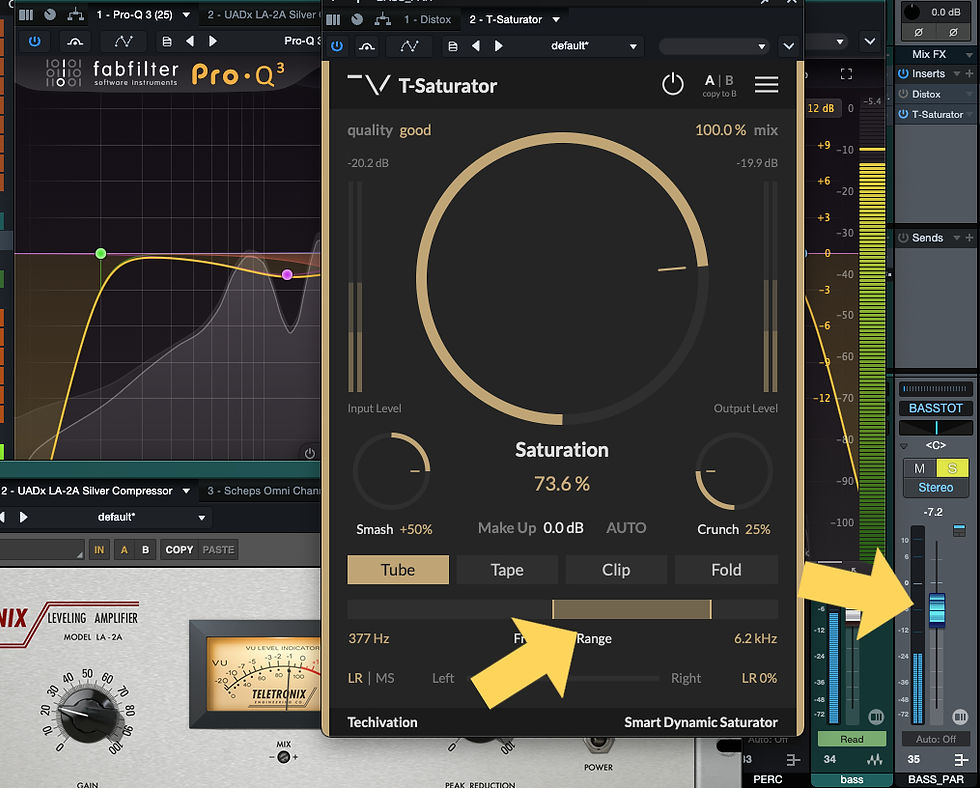
Duplicate the bass track (or create a parallel one that receives the original track via send).
On the new track, use the filters to create a passband: cut everything below 600 Hz and above 1.5 kHz (adjust according to the song). This way, you won't create strange phase issues or low-end cancellations.
Destroy this filtered track with a saturator or distortion.
Leave the original track intact to preserve all the weight and cleanness of the low-end, and use the parallel track fader to add the new harmonics to the main mix.
(Note: As an alternative to this routing, you can use a multiband saturation plugin to apply distortion only and exclusively to the specific mid frequency range.)
The surgical trick: The Mix Check with ISOL8
The problem with parallel saturation is to dose it.
If you add too much, the bass sounds unnatural, distorted, and scratchy. If you're too careful, it's useless.
How do you figure out what the perfect balance is?
You need to do a check by emulating a small device (like a smartphone or laptop), because these small speakers are not physically capable of reproducing low frequencies.
If the bass articulation stands out well there, your mix will sound good everywhere.
Here's my foolproof method for doing it for free:
Download the free ISOL8 plugin (by TBProAudio) and add it last on your Master Bus. This tool allows you to instantly isolate frequency bands in your entire mix.
Set the midrange to "Solo," muting the lows and highs. Now your monitors will exactly emulate a small speaker.
With ISOL8 active, turn your bass parallel distortion fader down to zero.
Hit play and start gradually raising the distortion fader until you can clearly distinguish the attack and bass notes among the guitars and vocals, checking with the track's Mute button to notice the real difference.
As soon as the articulation of the notes is clear and intelligible, stop.
Turn off ISOL8 and go back to listening to the full-band mix. Boom. The bass has its titanic low-end punch intact, but now it bites and cuts through the mix on any device.

The final step: The true analog weight
You've balanced the bass, the kick drum breathes, and the arrangement works. You've done everything you can to give that low-end an undeniable weight and density, but the harmonic saturation of software plugins still struggles to replicate the nonlinear, explosive behavior of physical transformers.
When you entrust your finished tracks to VDSS Studio 's Online Mastering or Stem Mastering services, your music finally leaves your computer. Your stems are physically summed in our Neve 8816 summing mixer, passing through real transformers to massively sculpt the lows.
We glue it all together and give it a unique three-dimensionality with our custom Vari-Mu compressor and, if you're looking for a dense, organic color, we print the master on our MCI JH24 24-track tape recorder .
Finally, we surgically recapture everything through the analog stage of the Burl B2 converters.
The result? The surgical detail of your digital mix fused with the overwhelming weight of top-of-the-line hardware.
Stop playing fake. Get your music out of the box.


Comments